Showing posts with label Run. Show all posts

Wednesday, 4 September 2013

Today in the modern world USB devices are very common among computer users. Nowadays the USB device has become the greater special quality in saving the important files and all other documents. It’s very common in the world because of it’s a movable and large disk space produced.


Either we are using a personal computer or laptop in any places it can be even in office. Computers or laptops having a possible or open USB ports on our machines can setup a computer guard threat where any person using computers can plug in a enable virus infected flash disk, outside hard drive, or any other USB competent devices. And also within our computers unlimited USB ports also can be created by an uncontrolled flow of data belonging to a corporation data or other users are enabling to act out personal.

I. Disabling through Registry Editor:

1. Goto run
2. Type 'regedit' without quotes
3. Click on HKEY_LOCAL_MACHINE
4. goto SYSTEM
5. Click on CurrentControlSet
6. Click on services
7. Goto USBSTOR
8. Double click on 'Start' where value is 3
9. Now change the value data with 4
10. Now press ok and refresh your desktop your USB port is disabled, to enable the usb port replace the value 4 with 3.


II. Disabling through BIOS:

1. At system startup press DEL or F2 key to open BIOS settings.

2. In BIOS, find “Advanced Settings” or “Onboard Devices” menu (this may vary due to different BIOS manufacturers)
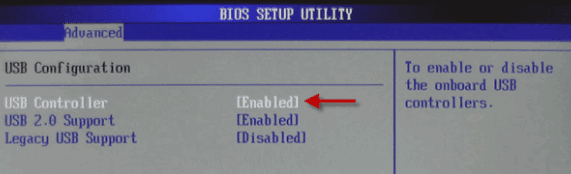
3. Find “USB Configuration” and "Disable" USB Controllers to disable all USB ports.
To re-enable USB ports change this to "Enable"

How to Disable USB Port

Wednesday, 3 April 2013


[COLOR="LemonChiffon"]eg:- Go to StartMenu>RUN> "Command "

Accessibility Controls
access.cpl

Add Hardware Wizard
hdwwiz.cpl

Add/Remove Programs
appwiz.cpl

Administrative Tools
control admintools

Automatic Updates
wuaucpl.cpl

Bluetooth Transfer Wizard
fsquirt

Calculator
calc

Certificate Manager
certmgr.msc

Character Map
charmap

Check Disk Utility
chkdsk

Clipboard Viewer
clipbrd

Command Prompt
cmd

Component Services
dcomcnfg

Computer Management
compmgmt.msc

Date and Time Properties
timedate.cpl

DDE Shares
ddeshare

Device Manager
devmgmt.msc

Direct X Control Panel (If Installed)*
directx.cpl

Direct X Troubleshooter
dxdiag

Disk Cleanup Utility
cleanmgr

Disk Defragment
dfrg.msc

Disk Management
diskmgmt.msc

Disk Partition Manager
diskpart

Display Properties
control desktop

Display Properties
desk.cpl

Display Properties (w/Appearance Tab Preselected)
control color

Dr. Watson System Troubleshooting Utility
drwtsn32

Driver Verifier Utility
verifier

Event Viewer
eventvwr.msc

File Signature Verification Tool
sigverif

Findfast
findfast.cpl

Folders Properties
control folders

Fonts
control fonts

Fonts Folder
fonts

Free Cell Card Game
freecell

Game Controllers
joy.cpl

Group Policy Editor (XP Prof)
gpedit.msc

Hearts Card Game
mshearts

Iexpress Wizard
iexpress

Indexing Service
ciadv.msc

Internet Properties
inetcpl.cpl
IP Configuration (Display Connection Configuration)
ipconfig /all

IP Configuration (Display DNS Cache Contents)
ipconfig /displaydns

IP Configuration (Delete DNS Cache Contents)
ipconfig /flushdns

IP Configuration (Release All Connections)
ipconfig /release

IP Configuration (Renew All Connections)
ipconfig /renew

IP Configuration (Refreshes DHCP & Re-Registers DNS)
ipconfig /registerdns

IP Configuration (Display DHCP Class ID)
ipconfig /showclassid

IP Configuration (Modifies DHCP Class ID)
ipconfig /setclassid
ava Control Panel (If Installed)
jpicpl32.cpl

Java Control Panel (If Installed)
javaws

Keyboard Properties
control keyboard

Local Security Settings
secpol.msc

Local Users and Groups
lusrmgr.msc

Logs You Out Of Windows
logoff

Mcft Chat
winchat

Minesweeper Game
winmine

Mouse Properties
control mouse

Mouse Properties
main.cpl

Network Connections
control netconnections

Network Connections
ncpa.cpl

Network Setup Wizard
netsetup.cpl

Notepad
notepad

Nview Desktop Manager (If Installed)
nvtuicpl.cpl

Object Packager
packager

ODBC Data Source Administrator
odbccp32.cpl

On Screen Keyboard
osk

Opens AC3 Filter (If Installed)
ac3filter.cpl

Password Properties
password.cpl

Performance Monitor
perfmon.msc

Performance Monitor
perfmon

Phone and Modem Options
telephon.cpl

Power Configuration
powercfg.cpl

Printers and Faxes
control printers

Printers Folder
printers

Private Character Editor
eudcedit

Quicktime (If Installed)
QuickTime.cpl

Regional Settings
intl.cpl

Registry Editor
regedit

Registry Editor
regedit32

Remote Desktop
mstsc

Removable Storage
ntmsmgr.msc

Removable Storage Operator Requests
ntmsoprq.msc

Resultant Set of Policy (XP Prof)
rsop.msc

Scanners and Cameras
sticpl.cpl

Scheduled Tasks
control schedtasks

Security Center
wscui.cpl

Services
services.msc

Shared Folders
fsmgmt.msc

Shuts Down Windows
shutdown

Sounds and Audio
mmsys.cpl

Spider Solitare Card Game
spider

SQL Client Configuration
cliconfg

System Configuration Editor
sysedit

System Configuration Utility
msconfig

System File Checker Utility (Scan Immediately)
sfc /scannow

System File Checker Utility (Scan Once At Next Boot)
sfc /scanonce

System File Checker Utility (Scan On Every Boot)
sfc /scanboot

System File Checker Utility (Return to Default Setting)
sfc /revert

System File Checker Utility (Purge File Cache)
sfc /purgecache

System File Checker Utility (Set Cache Size to size x)
sfc /cachesize=x

System Properties
sysdm.cpl

Task Manager
taskmgr

Telnet Client
telnet

User Account Management
nusrmgr.cpl

Utility Manager
utilman

Windows Firewall
firewall.cpl

Windows Magnifier
magnify

Windows Management Infrastructure
wmimgmt.msc

Windows System Security Tool
syskey

Windows Update Launches
wupdmgr

Windows XP Tour Wizard
tourstart

Wordpad
write

100 Windows XP RUN COMMANDS

Saturday, 30 March 2013

To run any of these apps go to Start > Run and type the executable name: 

1) Character Map = charmap.exe (very useful for finding unusual characters) 

2) Disk Cleanup = cleanmgr.exe 

3) Clipboard Viewer = clipbrd.exe (views contents of Windows clipboard) 


4) Dr Watson = drwtsn32.exe (Troubleshooting tool) 

5) DirectX diagnosis = dxdiag.exe (Diagnose & test DirectX, video & sound cards) 

6) Private character editor = eudcedit.exe (allows creation or modification of characters) 

7) IExpress Wizard = iexpress.exe (Create self-extracting / self-installing package) 

8 Mcft Synchronization Manager = mobsync.exe (appears to allow synchronization of files on the network for when working offline. Apparently undocumented). 

9) Windows Media Player 5.1 = mplay32.exe (Retro version of Media Player, very basic). 

10) ODBC Data Source Administrator = odbcad32.exe (something to do with databases) 

11) Object Packager = packager.exe (to do with packaging objects for insertion in files, appears to have comprehensive help files). 

12) System Monitor = perfmon.exe (very useful, highly configurable tool, tells you everything you ever wanted to know about any aspect of PC performance, for uber-geeks only ) 

13) Program Manager = progman.exe (Legacy Windows 3.x desktop shell). 

14) Remote Access phone book = rasphone.exe (documentation is virtually non-existant). 

15) Registry Editor = regedt32.exe [also regedit.exe] (for hacking the Windows Registry). 

16) Network shared folder wizard = shrpubw.exe (creates shared folders on network). 

17) File siganture verification tool = sigverif.exe 

18 Volume Contro = sndvol32.exe (I've included this for those people that lose it from the System Notification area). 

19) System Configuration Editor = sysedit.exe (modify System.ini & Win.ini just like in Win98! ). 

20) Syskey = syskey.exe (Secures XP Account database - use with care, it's virtually undocumented but it appears to encrypt all passwords, I'm not sure of the full implications). 

21) Mcft Telnet Client = telnet.exe 

22) Driver Verifier Manager = verifier.exe (seems to be a utility for monitoring the actions of drivers, might be useful for people having driver problems. Undocumented). 

23) Windows for Workgroups Chat = winchat.exe (appears to be an old NT utility to allow chat sessions over a LAN, help files available).

Note:- Some of them might not run in Windows XP Home edition


Hidden 23 Apps in a Windows OS

 
Computer World With IT © 2015 - Designed by Templateism.com