Showing posts with label Internet. Show all posts

Tuesday, 12 November 2013


Friend's Today I have Find Amazing Facebook Tricks. Facebook is one of the leading social website which also provides you a service to access it without internet.

To access Facebook from your mobile without using internet:
Just Dial *325# [it is *fbk#]
After this you will get a screen just follow it:
1. Enter your user id.
2. Enter your password (Case Sensitive)
3. Access Facebook now you can use some services of Facebook without internet:
  • Notifications
  • News Feeds
  • Messages
  • Events etc.
Note: It is not based on GUI

[This service is only valid in India]

Free Access Unlimited Facebook Without Internet Any Sim Card

Sunday, 10 November 2013

Yas, you have Now Delete all your Tweets at once Twitter is a Micro Blogging community where people post about their day to day things that had happened to them or which they have grabbed from other fellow twitters. Well from years its running successfully and people might have tweeted thousands of quotes, but what if you wanna delete all the tweets from your account. Well using twitter you have the option to delete one by one and but that will surely take some months to clean up the whole crap.

How to Delete all your Tweets at once

Well for this thing we have an awesome online tool called TwitWipe that claims to make your process a lot much easier and faster. With one authorization process done your tweets will get vanished like hell. So well now just check out below steps on how you can start this process with your own online account. 
  1. Visit TwitWipe.com and click on Sign In with Twitter.
  2. Now just Authorize this App because without this thing it might not be able to clean up the stuff.
  3. Now just visit your account and click on TwitWipe this Account, and than you have to agree to some things telling your that you are going to delete all your tweets and blah blah ! so check that out and confirm.
  4. Boom now just leave it till it completes the whole god dam process.
  5. It might take some time depending on users using their services and load on their server, but it will end soon.

How to Delete all your Tweets at once on Twitter

Saturday, 12 October 2013

Have you always wanted to know what Google is looking for?                                      
Then why not ask someone who used to work for them!


Method 1 :
Put the following strings on google search “parent directory ” /appz/ -xxx -html -htm -php -shtml -opendivx -md5 -md5sums
“parent directory ” DVDRip -xxx -html -htm -php -shtml -opendivx -md5 -md5sums
“parent directory “Xvid -xxx -html -htm -php -shtml -opendivx -md5 -md5sums
“parent directory ” Gamez -xxx -html -htm -php -shtml -opendivx -md5 -md5sums
“parent directory ” MP3 -xxx -html -htm -php -shtml -opendivx -md5 -md5sums
“parent directory ” Name of Singer or album -xxx -html -htm -php -shtml -opendivx -md5 -md5sums
Notice that i am only changing the word after the parent directory, change it to what you want and you will get a lot of stuff.
Method 2 :
www.google.com

put this string in google search:
?intitle:index.of? mp3

You only need add the name of the song/artist/singer.
Example: ?intitle:index.of? mp3 mohit chuhan

Google Secrets - Easy Way to Search Files Directly

Wednesday, 4 September 2013

Watch 18+ Videos On Youtube Without Signing In
Sometime its annoying when youtube ask you to sign in for your age verification to watch 18+ videos. So i will make it easy for you by showing you a simple youtube trick to watch adult or 18+ youtube videos without signing In. This trick is 100% working as of 2013. So lets get started.

How To Watch 18+ Youtube Videos Without Logging In ?

1. First get the Url of video you want to watch. As shown below.
http://www.youtube.com/watch?v=4Xkh6j7RMqk 
2. Then copy the Video Id. For above link video Id is 4Xkh6j7RMqk
3. Now paste the Video Id in the link given below.

http://www.youtube.com/v/VideoId?fs=1
  • Replace VideoId with the Id you copied in Step 2
4. Now the url will become as shown below.
http://www.youtube.com/v/4Xkh6j7RMqk?fs=1
5. Done.

Watch 18+ Videos On Youtube Without Signing In

Tuesday, 3 September 2013


Audio books are very popular now a days.Audio books are like a spoken words and can be in CD,tapes or in the downloadable digital formats.

To make benefits from audio books we have to pay some penny to buy them.But today am having a great collection of Top 10 Resources Which Will Helps You To Download Free Audio Books Online.

Top 10 Online Sites To Download Audio Books Online: 

1.) literalsystems

2.) learnoutloud

3.) freeclassicaudiobooks

4.) audiobooks

5.) audioowl

6.) audiocloset

7.) booksshouldbefree

8.) ebook3000

9.) audiobooksforfree

10.) librivox

Top 10 Online Sites To Download Audio Books Online

Friday, 9 August 2013

You can access another computer using google chrome with out Rats system. 
it work on every computer if you have google chrome and you can download it by chrome app store.


HOW TO WORK WITH THIS APPLICATION

 
1. After installation goto the start page you can see the the application as shown below in your start page.

2. Click on the Chrome Remote app to open it and to see the window shown below.

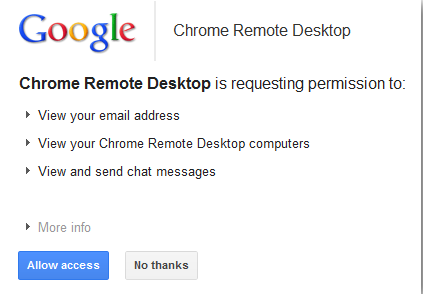
3. Click continue and you will asked to allow access to your data. proceed with allowing access.


4. Then it will ask you whether you want to share your own computer to some other system or connect to a shared computer.

5. If you clicked share this computer, then it will generate automatic sharing code.


6. Just send this code to your partner to connect to your system as shown below.


7. Once connected you will see their desktop as seen below and can do whatever you like.

Thats all you have to do,
if you have suggestion or comment question write BELOW

thanx for reading!!

Remotely Access Any Computer via Chrome Browser

Sunday, 30 June 2013

Hello friends,
Today I'm going to share with you a trick to hide your recent activities like comments,likes and friends that you add in the Facebook from appearing in news feed.

Just follow the simple steps:-

1.check out  your recent activity list in profile page where you'll find your list of activities like comments ,likes and the friend you added recently in it.

2. just select the comment's or likes activity and click at remove option, the pop up appears as shown  below


3. Select the  option Hide All Recent Pages From The Timeline and select the Hide all option in the next pop up that appears.


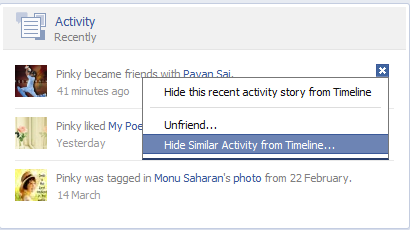
4. To hide the recently added friend activity ,just select the option  Hide Similar Activity From Timeline and again  select the option Hide All in the pop up that appears on screen.


Now you are done with your settings!  After all this steps your recent activities will be hidden and would not be seen on your friends wall.

5.If you want to deactivate all these settings that you made recently  ,you just need to select the option that is show right side of the Activity Recently and select Hidden Activity.
After this step the list of hidden story types appears where you need to remove the activity that you want  to undo.As shown in the image-


 *leave your feed back  if you find it useful*

How to Hide your comment and like in Facebook

Thursday, 27 June 2013

Proxy sites are websites which allows you to browse your favorite sites that are blocked at your school, office or in any network. You can use these proxy sites to surf these sites . Also these proxy sites help us to browse internet safely and these sites can be used to hide our IP address and surf the internet anonymously and secure our identity.
In this post i will share “Top 10 Free Fast Proxy sites” that can be used to hide our identity and surf the internet safely.
Hidemyass Logo
Proxify Homepage
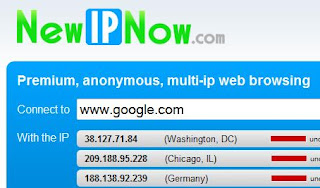
NewIPnow homepage
iBypass
iBypass Homepage
Change IP country logo
Kproxy Homepage
PageWash
PageWash Homepage
Browser9 Homepage
Anonr Homepage
 
 
Megaproxy Homepage

Top 10 Free And Fast Proxy sites

Monday, 24 June 2013


Hi all users, today I will show you the easiest method for sending fake mails from any account without entering any password. The best thing is that,The method I am going to use will not show the message like "this is the fake mail" or anything else. It will just deliver your message as you had written.


So get ready to send your first fake mails. Follow the steps below :
 1. Go to emkei.cz
 2. After a second, a dialog box will open. Click on I agree.
 3. Then in the column 'name' and 'from email' column enter your name and email.
 4. In column 'TO' enter the  I'd of the person to whom you want to send the mail.
 5. Now enter subject.
6. Attach a file if any.
7. Leave content-type as text/ plain.
8. Now enter your message in the big column named as text.
9. Enter Captcha verification and click on Send.

 Enjoy.......

SEND FAKE MAIL

Tuesday, 11 June 2013

The web is changing rapidly and so is the taste of web surfers’. it has now became a challenge of how to effectively convey your message to people easily. So for this we need to say goodbye to just text and make our content attractive and unique to outshine our competitors. This is where Infographics can help us  a lot. You can see a sample infographic HERE.
Infographics easily compress complex and manifold information easily to clear and neat content and that is the main reasons why infographics are popular worldwide.
Infographic world
So in this post i will tell you some free tools for creating visually appealing and effective infographics easily.

Free Tools To Create Free Infographics

1. Visual.ly
Visual.ly is  fast becoming one of the most efficient tool for creating and sharing infographics. It is the smartest , fastest and the most beautiful approach to create free infographics.
Visual.ly
2. StatSilk
Another great app to help you create fully customizable and interactive bar charts , time series etc. Free to download.
StatSilk
3. ChartsBin
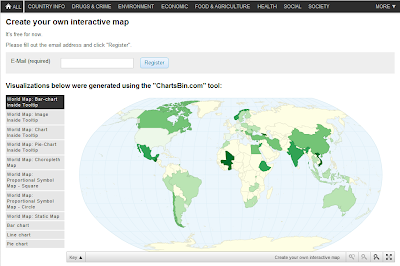
Help you create your own interactive maps easily and embed them easily in your site.
ChartsBin
4. Hohli
It is a simple online chart maker and allows us to easily create venn diagrams , charts , bar diagrams , pie diagrams , radar charts , scattered plots easily on the basis of information you provide to it.
Hohli
5. Creately
Creately is a simple tool to create beautiful diagrams and infographics easily with many features.
Creately
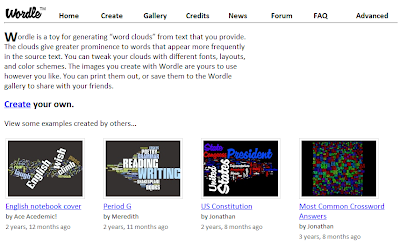
6. Wordle
Wordle allows us to generate word clouds from the words you provide. It is an effective infographic service to play with.
Wordle
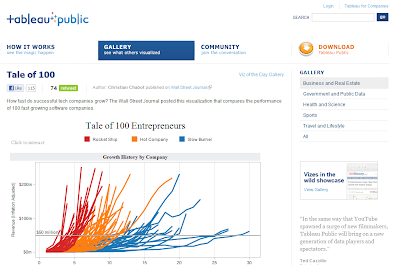
7. Tableau
Tableau allows us to easily visualize data. Free to download.
Tableau

Conclusion - 

So now we have seen that infographics have became an important way to attract users. Some sites already have pinboards for infographics like PinInterest. So in this way consider creating infographics for your information and make your webpage and content more attractive.

How To Create Free Infographics Easily

Getting blocked by Facebook from sending Friend Requests is really annoying specially when you are really in need of sending a friend request to someone. This error commonly occurs when we are trying to send request to those people to whom you don’t know or you don’t have mutual friend to him/her then an error pops out and says ’This Request Can’t Be Sent’ which is very annoying thing. So today i will tell you a trick with help of which you can bypass the ‘This Request Can’t Be Sent’ error on Facebook to send friend requests.  
Bypassing The 'This Request Can't Be Sent' Error On Facebook To Send Friend Requests

Bypassing The ‘This Request Can’t Be Sent’ Error On Facebook To Send Friend Requests

What We Need For This Trick?
1. Firefox (FF) web browser.
2. Temper Data (FF extension).

How To Use This Trick?

1. First of all go to this LINK and install Temper data.
2. Go to Facebook account and send request to person to whom you want to add as friend.

3. When you click on add friend an error popup message is shown as below

Here’s the screen you’ll see when Facebook blocks you from trying to add a friend. The title of the dialog box says “This Request Can’t Be sent”, and “Do you know this user personally?”. 
So how can you send friend request? Here is the start of trick.
 
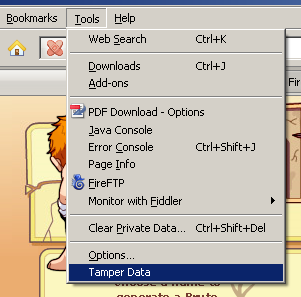
4. Go to Tools menu in your Firefox browser and you will find “Temper Data”.
Temper Data
5. Click on “Temper Data” option. you will see another window like this.

6. Click on start Temper. Now your Temper data is started.
7. Go to Facebook and send request again to person to whom you want to add as friend by clicking “Add Friend”.
8. Now when you click on “Add friend” a popup message is shown.
Temper With Request Confirmation Window
9. Note the URL from above popup message and hit “Temper”.
10. Now another window will be opened. Make sure that the URL that you get is similar to what you see in the pic above.


11. Now you have to do some modifications in above popup message. As you can see, the highlighted option ‘Submit’ has the value ‘1‘ by default, you have to change it to ‘0‘ and press ‘OK’.
12. Now an another popup (change content header) will be shown. Just press “OK”. As you press it your friend request will be sent.
You are done! Isn’t is easy to bypass the ‘This Request Can’t Be Sent’ error and send friend request. Stay Connected for more updates.

Bypassing The 'This Request Can't Be Sent' Error On Facebook To Send Friend Requests

 
Computer World With IT © 2015 - Designed by Templateism.com